
上拉加载,是目前手机网站加载数据的一种常用方式,本文主要讲解anglarjs集成,上拉加载功能。
简介
上拉加载,是目前手机网站加载数据的一种常用方式,本文主要讲解anglarjs集成,上拉加载功能。通常与下拉刷新配置使用,下拉刷新请查阅。
实现
页面
 <p class="search-box">
 <b class="dw" ></b>
  <input type="search" class="search-input" placeholder="请输入搜索关键词" ng-model="catparm">
  <b class="dw" ng-click="serchcat()"><img  src="{{basepath}}images/cg-app-search.png" alt="使用AnglarJs实现上拉加载" ></b>
 </p>
 <p class="list-box" >
  <p infinite-scroll='catinfo.nextPage()' infinite-scroll-disabled='catinfo.busy' infinite-scroll-distance='' id="catinfolist">
  <ul>
   <li ng-repeat='branch in catinfo.items'>
  <!-- <li ng-repeat="branch in branchs">-->
   <a ng-click="showqr(branch.qr)">
   <dl>
   <dt class="search-key-img">
    <img  ng-src="{{branch.catimg}}" alt="使用AnglarJs实现上拉加载" >
   </dt>
   <dd class="search-key-title">
    <p>{{branch.title}}</p>
    </dd>
    <dd class="search-key-info">
    <span>联系人:{{branch.linkman}} </span><span>品种:{{branch.varieties}} </span> <span style="color: red;">价格:{{branch.price}} </span>
    </dd>
    <dd class="search-key-tag">
    <span>地址:{{branch.region}}</span><span ng-if="branch.wechatno !=''">微信号:{{branch.wechatno}}</span>
    </dd>
    <dd class="search-key-tag">
     <p> 发布时间:{{branch.releasetime}}</p>
                    <div class="aritcle_card">
                        <a class="aritcle_card_img" href="/xiazai/js/4907">
                            <img src="https://img.php.cn/upload/jscode/000/120/096/5dbbd536008c4747.jpg" alt="iscroll5实现的仿原生下拉刷新,上拉加载效果">
                        </a>
                        <div class="aritcle_card_info">
                            <a href="/xiazai/js/4907">iscroll5实现的仿原生下拉刷新,上拉加载效果</a>
                            <p>iscroll5实现的仿原生下拉刷新,上拉加载效果</p>
                            <div class="">
                                <img src="/static/images/card_xiazai.png" alt="iscroll5实现的仿原生下拉刷新,上拉加载效果">
                                <span>35</span>
                            </div>
                        </div>
                        <a href="/xiazai/js/4907" class="aritcle_card_btn">
                            <span>查看详情</span>
                            <img src="/static/images/cardxiayige-3.png" alt="iscroll5实现的仿原生下拉刷新,上拉加载效果">
                        </a>
                    </div>

    </dd>
   </dl>
   </a>
  </li>
  </ul>
   <p ng-if="catinfo.items.length >= 10 ">
    <p ng-show='catinfo.busy' align="center" style="margin-top:5px; "><!--<img  src="{{basepath}}images/729.GIF"   style="max-width:90%" alt="使用AnglarJs实现上拉加载" >-->loading......</p>
   </p>
   <p ng-if="catinfo.items.length % 10 !=0 ">
    <p class="get-more">我也是有底线的</p>
   </p>
  </p>
  <dialog load-data="data"></dialog>
</p>controller中上拉加载功能使用
app.controller('wdListCtrl', ['$scope','catInfoService', function ($scope,catInfoService) {
//下拉加载service
$scope.catinfo = new catInfoService();封装上拉加载CatInfoService.js
/** 2017-10-26
 *作者:卜凡起
 *功能:
 */
define(['jquery','app'], function ($,app) {
 app.service('catInfoService', ['$location','$http', function($location,$http) {
  var CatInfo = function () {
   this.items =null;
   this.busy = false;
   this.after = '';
   this.page = 1;
   this.pagenum =10;
   this.title = '';
   this.varieties ='';
  };
  CatInfo.prototype.nextPage = function () {
   if (this.busy) return;
   this.busy = true;
   var url = baseurl+"接口地址?page=" + this.page + "&pagenum="+ this.pagenum + "&title="+this.title+ "&varieties="+this.varieties+"&callback=JSON_CALLBACK";
   $http.jsonp(url).success(function(data) {
    var items =data.data;
    console.log(items);
    if( this.items == null){
     this.items=items;
    }else{
     for (var i =0;i < items.length; i++) {
      this.items.push(items[i]);
     }
    }
    this.after = "t_" + this.items[this.items.length -1 ].id;
    if(items != null){
     if(items.length< 10){
      this.busy = true;
     }else{
      this.busy = false;
     }
    }
    this.page +=1;
   }.bind(this));
  };
  return CatInfo;
 }] );
});效果
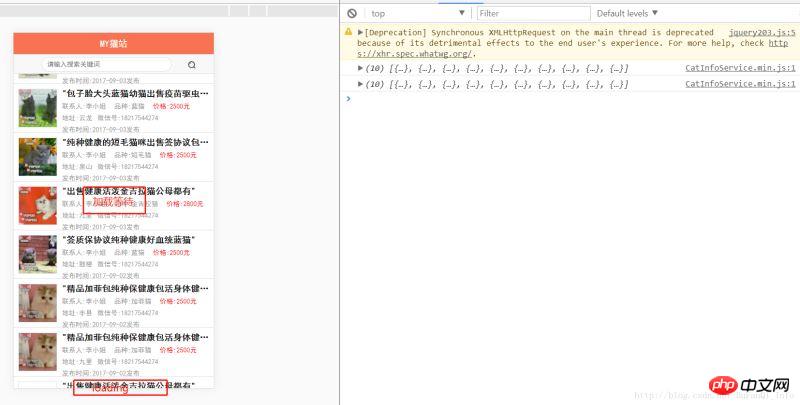
上面是我整理给大家的,希望今后会对大家有帮助。
相关文章:
以上就是使用AnglarJs实现上拉加载的详细内容,更多请关注php中文网其它相关文章!

每个人都需要一台速度更快、更稳定的 PC。随着时间的推移,垃圾文件、旧注册表数据和不必要的后台进程会占用资源并降低性能。幸运的是,许多工具可以让 Windows 保持平稳运行。

Copyright 2014-2025 https://www.php.cn/ All Rights Reserved | php.cn | 湘ICP备2023035733号


 516
516




 收藏
收藏







 取消收藏
取消收藏







