



整体架构
考虑到磁盘文件分布到不同的设备上,所以采用磁盘扫瞄代理的模式构建系统,即把扫描服务以代理的方式部署到目标磁盘所在的服务器上,作为定时任务执行,索引统一建立到ES中,当然ES采用分布式高可用部署方法,搜索服务和扫描代理部署到一起来简化架构并实现分布式能力。

磁盘文件快速检索架构
部署ES
ES(elasticsearch)是本项目唯一依赖的第三方软件,ES支持docker方式部署,以下是部署过程
docker pull docker.elastic.co/elasticsearch/elasticsearch:6.3.2
docker run -e ES_JAVA_OPTS="-Xms256m -Xmx256m" -d -p 9200:9200 -p 9300:9300 --name es01 docker.elastic.co/elasticsearch/elasticsearch:6.3.2
部署完成后,通过浏览器打开http://localhost:9200,如果正常打开,出现如下界面,则说明ES部署成功。
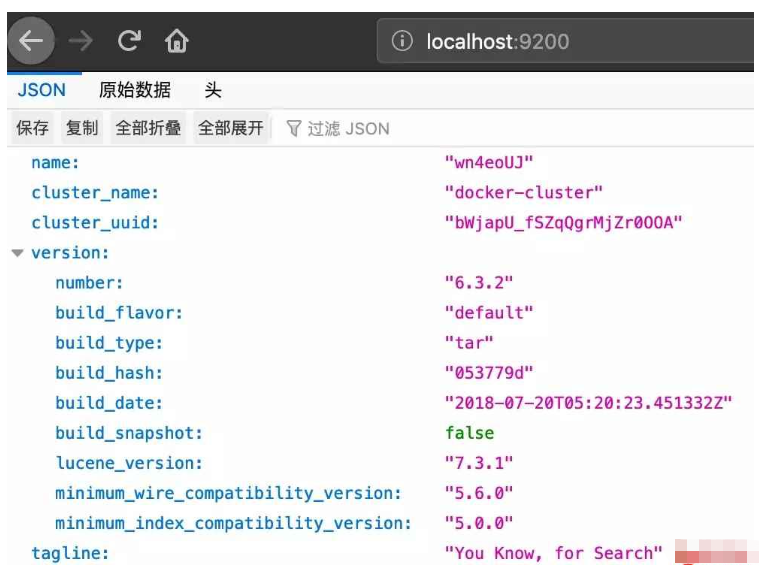
ES界面
工程结构

工程结构
依赖包
本项目除了引入springboot的基础starter外,还需要引入ES相关包
      org.springframework.boot
      spring-boot-starter-data-elasticsearch


      io.searchbox
      jest
      5.3.3


      net.sf.jmimemagic
      jmimemagic
      0.1.4
配置文件
需要将ES的访问地址配置到application.yml里边,同时为了简化程序,需要将待扫描磁盘的根目录(index-root)配置进去,后面的扫描任务就会递归遍历该目录下的全部可索引文件。
server:
 port: @elasticsearch.port@
spring:
 application:
  name: @project.artifactId@
 profiles:
  active: dev
 elasticsearch:
  jest:
   uris: http://127.0.0.1:9200
index-root: /Users/crazyicelee/mywokerspace
索引结构数据定义

因为要求文件所在目录、文件名、文件正文都有能够检索,所以要将这些内容都作为索引字段定义,而且添加ES client要求的JestId来注解id。
package com.crazyice.lee.accumulation.search.data;

import io.searchbox.annotations.JestId;
import lombok.Data;

@Data
public class Article {
  @JestId
  private Integer id;
  private String author;
  private String title;
  private String path;
  private String content;
  private String fileFingerprint;
}
扫描磁盘并创建索引
因为要扫描指定目录下的全部文件,所以采用递归的方法遍历该目录,并标识已经处理的文件以提升效率,在文件类型识别方面采用两种方式可供选择,一个是文件内容更为精准判断(Magic),一种是以文件扩展名粗略判断。这部分是整个系统的核心组件。
这里有个小技巧
对目标文件内容计算MD5值并作为文件指纹存储到ES的索引字段里边,每次在重建索引的时候判断该MD5是否存在,如果存在就不用重复建立索引了,可以避免文件索引重复,也能避免系统重启后重复遍历文件。
package com.crazyice.lee.accumulation.search.service;

import com.alibaba.fastjson.JSONObject;
import com.crazyice.lee.accumulation.search.data.Article;
import com.crazyice.lee.accumulation.search.utils.Md5CaculateUtil;
import io.searchbox.client.JestClient;
import io.searchbox.core.Index;
import io.searchbox.core.Search;
import io.searchbox.core.SearchResult;
import lombok.extern.slf4j.Slf4j;
import net.sf.jmimemagic.*;
import org.apache.poi.hwpf.extractor.WordExtractor;
import org.apache.poi.xwpf.extractor.XWPFWordExtractor;
import org.apache.poi.xwpf.usermodel.XWPFDocument;
import org.elasticsearch.index.query.QueryBuilders;
import org.elasticsearch.search.builder.SearchSourceBuilder;
import org.springframework.beans.factory.annotation.Autowired;
import org.springframework.stereotype.Component;

import java.io.File;
import java.io.FileInputStream;
import java.io.FileNotFoundException;
import java.io.IOException;

@Component
@Slf4j
public class DirectoryRecurse {

  @Autowired
  private JestClient jestClient;

  //读取文件内容转换为字符串
  private String readToString(File file, String fileType) {
    StringBuffer result = new StringBuffer();
    switch (fileType) {
      case "text/plain":
      case "java":
      case "c":
      case "cpp":
      case "txt":
        try (FileInputStream in = new FileInputStream(file)) {
          Long filelength = file.length();
          byte[] filecontent = new byte[filelength.intValue()];
          in.read(filecontent);
          result.append(new String(filecontent, "utf8"));
        } catch (FileNotFoundException e) {
          log.error("{}", e.getLocalizedMessage());
        } catch (IOException e) {
          log.error("{}", e.getLocalizedMessage());
        }
        break;
      case "doc":
        //使用HWPF组件中WordExtractor类从Word文档中提取文本或段落
        try (FileInputStream in = new FileInputStream(file)) {
          WordExtractor extractor = new WordExtractor(in);
          result.append(extractor.getText());
        } catch (Exception e) {
          log.error("{}", e.getLocalizedMessage());
        }
        break;
      case "docx":
        try (FileInputStream in = new FileInputStream(file); XWPFDocument doc = new XWPFDocument(in)) {
          XWPFWordExtractor extractor = new XWPFWordExtractor(doc);
          result.append(extractor.getText());
        } catch (Exception e) {
          log.error("{}", e.getLocalizedMessage());
        }
        break;
    }
    return result.toString();
  }

  //判断是否已经索引
  private JSONObject isIndex(File file) {
    JSONObject result = new JSONObject();
    //用MD5生成文件指纹,搜索该指纹是否已经索引
    String fileFingerprint = Md5CaculateUtil.getMD5(file);
    result.put("fileFingerprint", fileFingerprint);
    SearchSourceBuilder searchSourceBuilder = new SearchSourceBuilder();
    searchSourceBuilder.query(QueryBuilders.termQuery("fileFingerprint", fileFingerprint));
    Search search = new Search.Builder(searchSourceBuilder.toString()).addIndex("diskfile").addType("files").build();
    try {
      //执行
      SearchResult searchResult = jestClient.execute(search);
      if (searchResult.getTotal() > 0) {
        result.put("isIndex", true);
      } else {
        result.put("isIndex", false);
      }
    } catch (IOException e) {
      log.error("{}", e.getLocalizedMessage());
    }
    return result;
  }

  //对文件目录及内容创建索引
  private void createIndex(File file, String method) {
    //忽略掉临时文件,以~$起始的文件名
    if (file.getName().startsWith("~$")) return;

    String fileType = null;
    switch (method) {
      case "magic":
        Magic parser = new Magic();
        try {
          MagicMatch match = parser.getMagicMatch(file, false);
          fileType = match.getMimeType();
        } catch (MagicParseException e) {
          //log.error("{}",e.getLocalizedMessage());
        } catch (MagicMatchNotFoundException e) {
          //log.error("{}",e.getLocalizedMessage());
        } catch (MagicException e) {
          //log.error("{}",e.getLocalizedMessage());
        }
        break;
      case "ext":
        String filename = file.getName();
        String[] strArray = filename.split("\\.");
        int suffixIndex = strArray.length - 1;
        fileType = strArray[suffixIndex];
    }

    switch (fileType) {
      case "text/plain":
      case "java":
      case "c":
      case "cpp":
      case "txt":
      case "doc":
      case "docx":
        JSONObject isIndexResult = isIndex(file);
        log.info("文件名:{},文件类型:{},MD5:{},建立索引:{}", file.getPath(), fileType, isIndexResult.getString("fileFingerprint"), isIndexResult.getBoolean("isIndex"));

        if (isIndexResult.getBoolean("isIndex")) break;
        //1. 给ES中索引(保存)一个文档
        Article article = new Article();
        article.setTitle(file.getName());
        article.setAuthor(file.getParent());
        article.setPath(file.getPath());
        article.setContent(readToString(file, fileType));
        article.setFileFingerprint(isIndexResult.getString("fileFingerprint"));
        //2. 构建一个索引
        Index index = new Index.Builder(article).index("diskfile").type("files").build();
        try {
          //3. 执行
          if (!jestClient.execute(index).getId().isEmpty()) {
            log.info("构建索引成功!");
          }
        } catch (IOException e) {
          log.error("{}", e.getLocalizedMessage());
        }
        break;
    }
  }

  public void find(String pathName) throws IOException {
    //获取pathName的File对象
    File dirFile = new File(pathName);

    //判断该文件或目录是否存在,不存在时在控制台输出提醒
    if (!dirFile.exists()) {
      log.info("do not exit");
      return;
    }

    //判断如果不是一个目录,就判断是不是一个文件,时文件则输出文件路径
    if (!dirFile.isDirectory()) {
      if (dirFile.isFile()) {
        createIndex(dirFile, "ext");
      }
      return;
    }

    //获取此目录下的所有文件名与目录名
    String[] fileList = dirFile.list();

    for (int i = 0; i < fileList.length; i++) {
      //遍历文件目录
      String string = fileList[i];
      File file = new File(dirFile.getPath(), string);
      //如果是一个目录,输出目录名后,进行递归
      if (file.isDirectory()) {
        //递归
        find(file.getCanonicalPath());
      } else {
        createIndex(file, "ext");
      }
    }
  }
}
扫描任务
这里采用定时任务的方式来扫描指定目录以实现动态增量创建索引。
package com.crazyice.lee.accumulation.search.service;

import lombok.extern.slf4j.Slf4j;
import org.springframework.beans.factory.annotation.Autowired;
import org.springframework.beans.factory.annotation.Value;
import org.springframework.context.annotation.Configuration;
import org.springframework.scheduling.annotation.Scheduled;
import org.springframework.stereotype.Component;

import java.io.IOException;

@Configuration
@Component
@Slf4j
public class CreateIndexTask {
  @Autowired
  private DirectoryRecurse directoryRecurse;

  @Value("${index-root}")
  private String indexRoot;

  @Scheduled(cron = "* 0/5 * * * ?")
  private void addIndex(){
    try {
      directoryRecurse.find(indexRoot);
      directoryRecurse.writeIndexStatus();
    } catch (IOException e) {
      log.error("{}",e.getLocalizedMessage());
    }
  }
}
搜索服务
这里以restFul的方式提供搜索服务,将关键字以高亮度模式提供给前端UI,浏览器端可以根据返回的JSON进行展示。
package com.crazyice.lee.accumulation.search.web;

import com.alibaba.fastjson.JSONObject;
import com.crazyice.lee.accumulation.search.data.Article;
import io.searchbox.client.JestClient;
import io.searchbox.core.Search;
import io.searchbox.core.SearchResult;
import io.swagger.annotations.ApiImplicitParam;
import io.swagger.annotations.ApiImplicitParams;
import io.swagger.annotations.ApiOperation;
import lombok.extern.slf4j.Slf4j;
import org.elasticsearch.index.query.BoolQueryBuilder;
import org.elasticsearch.index.query.QueryBuilders;
import org.elasticsearch.search.builder.SearchSourceBuilder;
import org.elasticsearch.search.fetch.subphase.highlight.HighlightBuilder;
import org.springframework.beans.factory.annotation.Autowired;
import org.springframework.lang.NonNull;
import org.springframework.web.bind.annotation.PathVariable;
import org.springframework.web.bind.annotation.RequestMapping;
import org.springframework.web.bind.annotation.RequestMethod;
import org.springframework.web.bind.annotation.RestController;

import java.io.IOException;
import java.util.HashMap;
import java.util.List;
import java.util.Map;

@RestController
@Slf4j
public class Controller {
  @Autowired
  private JestClient jestClient;

  @RequestMapping(value = "/search/{keyword}",method = RequestMethod.GET)
  @ApiOperation(value = "全部字段搜索关键字",notes = "es验证")
  @ApiImplicitParams(
      @ApiImplicitParam(name = "keyword",value = "全文检索关键字",required = true,paramType = "path",dataType = "String")
  )
  public List search(@PathVariable String keyword){
    SearchSourceBuilder searchSourceBuilder = new SearchSourceBuilder();
    searchSourceBuilder.query(QueryBuilders.queryStringQuery(keyword));

    HighlightBuilder highlightBuilder = new HighlightBuilder();
    //path属性高亮度
    HighlightBuilder.Field highlightPath = new HighlightBuilder.Field("path");
    highlightPath.highlighterType("unified");
    highlightBuilder.field(highlightPath);
    //title字段高亮度
    HighlightBuilder.Field highlightTitle = new HighlightBuilder.Field("title");
    highlightTitle.highlighterType("unified");
    highlightBuilder.field(highlightTitle);
    //content字段高亮度
    HighlightBuilder.Field highlightContent = new HighlightBuilder.Field("content");
    highlightContent.highlighterType("unified");
    highlightBuilder.field(highlightContent);

    //高亮度配置生效
    searchSourceBuilder.highlighter(highlightBuilder);

    log.info("搜索条件{}",searchSourceBuilder.toString());

    //构建搜索功能
    Search search = new Search.Builder(searchSourceBuilder.toString()).addIndex( "gf" ).addType( "news" ).build();
    try {
      //执行
      SearchResult result = jestClient.execute( search );
      return result.getHits(Article.class);
    } catch (IOException e) {
      log.error("{}",e.getLocalizedMessage());
    }
    return null;
  }
}
搜索restFul结果测试
这里以swagger的方式进行API测试。其中keyword是全文检索中要搜索的关键字。

搜索结果
使用thymeleaf生成UI
集成thymeleaf的模板引擎直接将搜索结果以web方式呈现。模板包括主搜索页和搜索结果页,通过@Controller注解及Model对象实现。




