



本文介绍零成本DIY网红万圣节写真的方法:用PaddleHub的deeplabv3p_xception65_humanseg模型进行人物抠图并更换背景(需注意背景尺寸匹配),再通过ultra_light_fast_generic_face_detector_1mb_640模型检测脸部,添加经美图秀秀处理成透明的头饰,含具体操作步骤与效果展示。
☞☞☞AI 智能聊天, 问答助手, AI 智能搜索, 免费无限量使用 DeepSeek R1 模型☜☜☜
在万圣节来临之际,手把手教大家如何零成本DIY网红万圣节写真,绚丽多彩的丰富背景以及炫酷的万圣节贴图随你选择,还支持自定义上传万圣节素材,我们先来抢先看看效果~
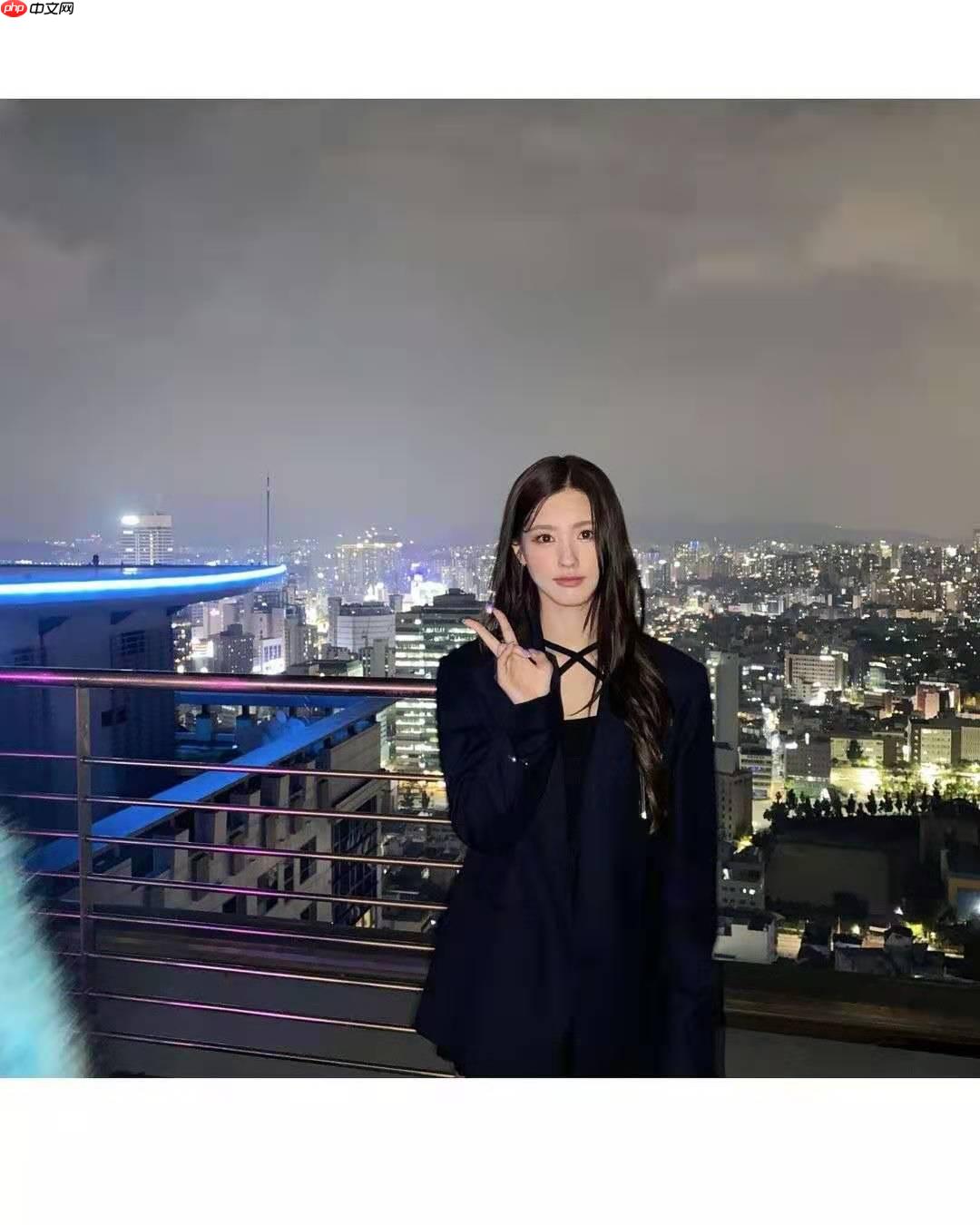
原图:
变换后:
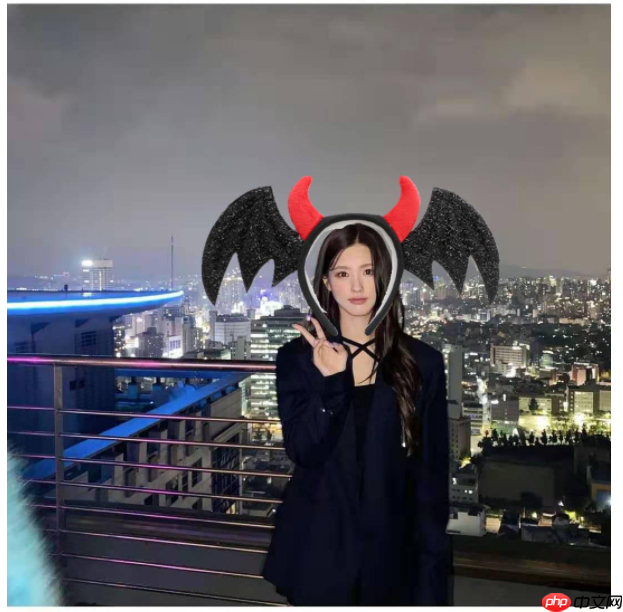
原图+头饰:
或者你会喜欢这一款
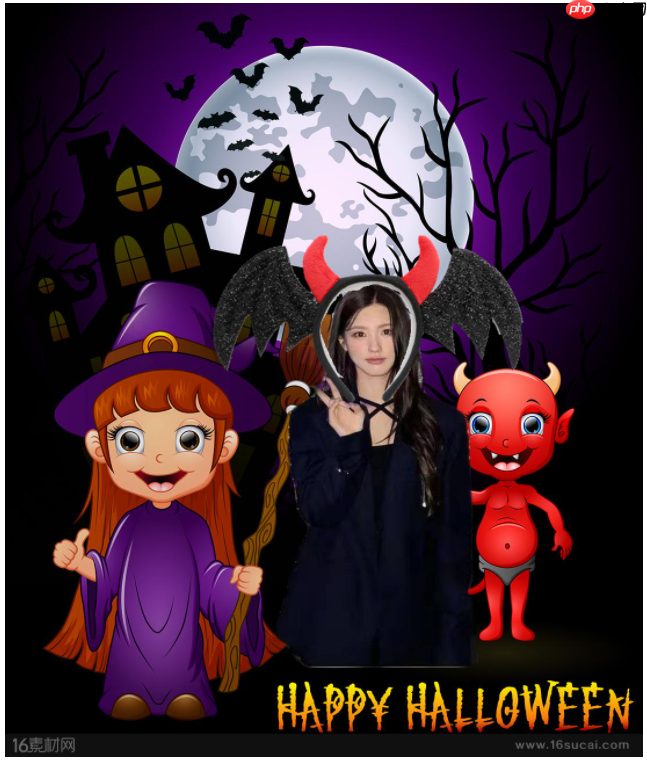
原图+切换背景+头饰:

倒包、设置必要环境
In [1]
!pip install paddlehub==1.6.2 -i https://pypi.tuna.tsinghua.edu.cn/simple
!hub install deeplabv3p_xception65_humanseg==1.0.0
Looking in indexes: https://pypi.tuna.tsinghua.edu.cn/simple
Collecting paddlehub==1.6.2
  Downloading https://pypi.tuna.tsinghua.edu.cn/packages/6e/07/d4839d63853c01d2f9d040ff079e63e007c9e4084e74f447baf46b426811/paddlehub-1.6.2-py3-none-any.whl (207kB)
     |████████████████████████████████| 215kB 4.2MB/s eta 0:00:01
Requirement already satisfied: chardet==3.0.4 in /opt/conda/envs/python35-paddle120-env/lib/python3.7/site-packages (from paddlehub==1.6.2) (3.0.4)
Requirement already satisfied: opencv-python in /opt/conda/envs/python35-paddle120-env/lib/python3.7/site-packages (from paddlehub==1.6.2) (4.1.1.26)
Requirement already satisfied: gunicorn>=19.10.0; sys_platform != "win32" in /opt/conda/envs/python35-paddle120-env/lib/python3.7/site-packages (from paddlehub==1.6.2) (20.0.4)
Requirement already satisfied: flake8 in /opt/conda/envs/python35-paddle120-env/lib/python3.7/site-packages (from paddlehub==1.6.2) (3.8.2)
Requirement already satisfied: pyyaml in /opt/conda/envs/python35-paddle120-env/lib/python3.7/site-packages (from paddlehub==1.6.2) (5.1.2)
Requirement already satisfied: yapf==0.26.0 in /opt/conda/envs/python35-paddle120-env/lib/python3.7/site-packages (from paddlehub==1.6.2) (0.26.0)
Requirement already satisfied: six>=1.10.0 in /opt/conda/envs/python35-paddle120-env/lib/python3.7/site-packages (from paddlehub==1.6.2) (1.15.0)
Requirement already satisfied: Pillow in /opt/conda/envs/python35-paddle120-env/lib/python3.7/site-packages (from paddlehub==1.6.2) (7.1.2)
Requirement already satisfied: pre-commit in /opt/conda/envs/python35-paddle120-env/lib/python3.7/site-packages (from paddlehub==1.6.2) (1.21.0)
Requirement already satisfied: flask>=1.1.0 in /opt/conda/envs/python35-paddle120-env/lib/python3.7/site-packages (from paddlehub==1.6.2) (1.1.1)
Requirement already satisfied: cma==2.7.0 in /opt/conda/envs/python35-paddle120-env/lib/python3.7/site-packages (from paddlehub==1.6.2) (2.7.0)
Requirement already satisfied: tensorboard>=1.15 in /opt/conda/envs/python35-paddle120-env/lib/python3.7/site-packages (from paddlehub==1.6.2) (2.1.0)
Requirement already satisfied: nltk in /opt/conda/envs/python35-paddle120-env/lib/python3.7/site-packages (from paddlehub==1.6.2) (3.4.5)
Requirement already satisfied: tb-paddle in /opt/conda/envs/python35-paddle120-env/lib/python3.7/site-packages (from paddlehub==1.6.2) (0.3.6)
Requirement already satisfied: colorlog in /opt/conda/envs/python35-paddle120-env/lib/python3.7/site-packages (from paddlehub==1.6.2) (4.1.0)
Requirement already satisfied: protobuf>=3.6.0 in /opt/conda/envs/python35-paddle120-env/lib/python3.7/site-packages (from paddlehub==1.6.2) (3.14.0)
Requirement already satisfied: pandas; python_version >= "3" in /opt/conda/envs/python35-paddle120-env/lib/python3.7/site-packages (from paddlehub==1.6.2) (1.1.5)
Requirement already satisfied: sentencepiece in /opt/conda/envs/python35-paddle120-env/lib/python3.7/site-packages (from paddlehub==1.6.2) (0.1.85)
Requirement already satisfied: numpy; python_version >= "3" in /opt/conda/envs/python35-paddle120-env/lib/python3.7/site-packages (from paddlehub==1.6.2) (1.20.3)
Requirement already satisfied: requests in /opt/conda/envs/python35-paddle120-env/lib/python3.7/site-packages (from paddlehub==1.6.2) (2.22.0)
Requirement already satisfied: setuptools>=3.0 in /opt/conda/envs/python35-paddle120-env/lib/python3.7/site-packages (from gunicorn>=19.10.0; sys_platform != "win32"->paddlehub==1.6.2) (56.2.0)
Requirement already satisfied: importlib-metadata; python_version < "3.8" in /opt/conda/envs/python35-paddle120-env/lib/python3.7/site-packages (from flake8->paddlehub==1.6.2) (0.23)
Requirement already satisfied: pycodestyle<2.7.0,>=2.6.0a1 in /opt/conda/envs/python35-paddle120-env/lib/python3.7/site-packages (from flake8->paddlehub==1.6.2) (2.6.0)
Requirement already satisfied: pyflakes<2.3.0,>=2.2.0 in /opt/conda/envs/python35-paddle120-env/lib/python3.7/site-packages (from flake8->paddlehub==1.6.2) (2.2.0)
Requirement already satisfied: mccabe<0.7.0,>=0.6.0 in /opt/conda/envs/python35-paddle120-env/lib/python3.7/site-packages (from flake8->paddlehub==1.6.2) (0.6.1)
Requirement already satisfied: nodeenv>=0.11.1 in /opt/conda/envs/python35-paddle120-env/lib/python3.7/site-packages (from pre-commit->paddlehub==1.6.2) (1.3.4)
Requirement already satisfied: virtualenv>=15.2 in /opt/conda/envs/python35-paddle120-env/lib/python3.7/site-packages (from pre-commit->paddlehub==1.6.2) (16.7.9)
Requirement already satisfied: identify>=1.0.0 in /opt/conda/envs/python35-paddle120-env/lib/python3.7/site-packages (from pre-commit->paddlehub==1.6.2) (1.4.10)
Requirement already satisfied: toml in /opt/conda/envs/python35-paddle120-env/lib/python3.7/site-packages (from pre-commit->paddlehub==1.6.2) (0.10.0)
Requirement already satisfied: cfgv>=2.0.0 in /opt/conda/envs/python35-paddle120-env/lib/python3.7/site-packages (from pre-commit->paddlehub==1.6.2) (2.0.1)
Requirement already satisfied: aspy.yaml in /opt/conda/envs/python35-paddle120-env/lib/python3.7/site-packages (from pre-commit->paddlehub==1.6.2) (1.3.0)
Requirement already satisfied: Werkzeug>=0.15 in /opt/conda/envs/python35-paddle120-env/lib/python3.7/site-packages (from flask>=1.1.0->paddlehub==1.6.2) (0.16.0)
Requirement already satisfied: Jinja2>=2.10.1 in /opt/conda/envs/python35-paddle120-env/lib/python3.7/site-packages (from flask>=1.1.0->paddlehub==1.6.2) (2.10.1)
Requirement already satisfied: click>=5.1 in /opt/conda/envs/python35-paddle120-env/lib/python3.7/site-packages (from flask>=1.1.0->paddlehub==1.6.2) (7.0)
Requirement already satisfied: itsdangerous>=0.24 in /opt/conda/envs/python35-paddle120-env/lib/python3.7/site-packages (from flask>=1.1.0->paddlehub==1.6.2) (1.1.0)
Requirement already satisfied: google-auth-oauthlib<0.5,>=0.4.1 in /opt/conda/envs/python35-paddle120-env/lib/python3.7/site-packages (from tensorboard>=1.15->paddlehub==1.6.2) (0.4.1)
Requirement already satisfied: absl-py>=0.4 in /opt/conda/envs/python35-paddle120-env/lib/python3.7/site-packages (from tensorboard>=1.15->paddlehub==1.6.2) (0.8.1)
Requirement already satisfied: markdown>=2.6.8 in /opt/conda/envs/python35-paddle120-env/lib/python3.7/site-packages (from tensorboard>=1.15->paddlehub==1.6.2) (3.1.1)
Requirement already satisfied: grpcio>=1.24.3 in /opt/conda/envs/python35-paddle120-env/lib/python3.7/site-packages (from tensorboard>=1.15->paddlehub==1.6.2) (1.35.0)
Requirement already satisfied: wheel>=0.26; python_version >= "3" in /opt/conda/envs/python35-paddle120-env/lib/python3.7/site-packages (from tensorboard>=1.15->paddlehub==1.6.2) (0.36.2)
Requirement already satisfied: google-auth<2,>=1.6.3 in /opt/conda/envs/python35-paddle120-env/lib/python3.7/site-packages (from tensorboard>=1.15->paddlehub==1.6.2) (1.10.0)
Requirement already satisfied: moviepy in /opt/conda/envs/python35-paddle120-env/lib/python3.7/site-packages (from tb-paddle->paddlehub==1.6.2) (1.0.1)
Requirement already satisfied: pytz>=2017.2 in /opt/conda/envs/python35-paddle120-env/lib/python3.7/site-packages (from pandas; python_version >= "3"->paddlehub==1.6.2) (2019.3)
Requirement already satisfied: python-dateutil>=2.7.3 in /opt/conda/envs/python35-paddle120-env/lib/python3.7/site-packages (from pandas; python_version >= "3"->paddlehub==1.6.2) (2.8.0)
Requirement already satisfied: idna<2.9,>=2.5 in /opt/conda/envs/python35-paddle120-env/lib/python3.7/site-packages (from requests->paddlehub==1.6.2) (2.8)
Requirement already satisfied: certifi>=2017.4.17 in /opt/conda/envs/python35-paddle120-env/lib/python3.7/site-packages (from requests->paddlehub==1.6.2) (2019.9.11)
Requirement already satisfied: urllib3!=1.25.0,!=1.25.1,<1.26,>=1.21.1 in /opt/conda/envs/python35-paddle120-env/lib/python3.7/site-packages (from requests->paddlehub==1.6.2) (1.25.6)
Requirement already satisfied: zipp>=0.5 in /opt/conda/envs/python35-paddle120-env/lib/python3.7/site-packages (from importlib-metadata; python_version < "3.8"->flake8->paddlehub==1.6.2) (0.6.0)
Requirement already satisfied: MarkupSafe>=0.23 in /opt/conda/envs/python35-paddle120-env/lib/python3.7/site-packages (from Jinja2>=2.10.1->flask>=1.1.0->paddlehub==1.6.2) (1.1.1)
Requirement already satisfied: requests-oauthlib>=0.7.0 in /opt/conda/envs/python35-paddle120-env/lib/python3.7/site-packages (from google-auth-oauthlib<0.5,>=0.4.1->tensorboard>=1.15->paddlehub==1.6.2) (1.3.0)
Requirement already satisfied: rsa<4.1,>=3.1.4 in /opt/conda/envs/python35-paddle120-env/lib/python3.7/site-packages (from google-auth<2,>=1.6.3->tensorboard>=1.15->paddlehub==1.6.2) (4.0)
Requirement already satisfied: cachetools<5.0,>=2.0.0 in /opt/conda/envs/python35-paddle120-env/lib/python3.7/site-packages (from google-auth<2,>=1.6.3->tensorboard>=1.15->paddlehub==1.6.2) (4.0.0)
Requirement already satisfied: pyasn1-modules>=0.2.1 in /opt/conda/envs/python35-paddle120-env/lib/python3.7/site-packages (from google-auth<2,>=1.6.3->tensorboard>=1.15->paddlehub==1.6.2) (0.2.7)
Requirement already satisfied: decorator<5.0,>=4.0.2 in /opt/conda/envs/python35-paddle120-env/lib/python3.7/site-packages (from moviepy->tb-paddle->paddlehub==1.6.2) (4.4.2)
Requirement already satisfied: proglog<=1.0.0 in /opt/conda/envs/python35-paddle120-env/lib/python3.7/site-packages (from moviepy->tb-paddle->paddlehub==1.6.2) (0.1.9)
Requirement already satisfied: tqdm<5.0,>=4.11.2 in /opt/conda/envs/python35-paddle120-env/lib/python3.7/site-packages (from moviepy->tb-paddle->paddlehub==1.6.2) (4.36.1)
Requirement already satisfied: imageio-ffmpeg>=0.2.0; python_version >= "3.4" in /opt/conda/envs/python35-paddle120-env/lib/python3.7/site-packages (from moviepy->tb-paddle->paddlehub==1.6.2) (0.3.0)
Requirement already satisfied: imageio<3.0,>=2.5; python_version >= "3.4" in /opt/conda/envs/python35-paddle120-env/lib/python3.7/site-packages (from moviepy->tb-paddle->paddlehub==1.6.2) (2.6.1)
Requirement already satisfied: more-itertools in /opt/conda/envs/python35-paddle120-env/lib/python3.7/site-packages (from zipp>=0.5->importlib-metadata; python_version < "3.8"->flake8->paddlehub==1.6.2) (7.2.0)
Requirement already satisfied: oauthlib>=3.0.0 in /opt/conda/envs/python35-paddle120-env/lib/python3.7/site-packages (from requests-oauthlib>=0.7.0->google-auth-oauthlib<0.5,>=0.4.1->tensorboard>=1.15->paddlehub==1.6.2) (3.1.0)
Requirement already satisfied: pyasn1>=0.1.3 in /opt/conda/envs/python35-paddle120-env/lib/python3.7/site-packages (from rsa<4.1,>=3.1.4->google-auth<2,>=1.6.3->tensorboard>=1.15->paddlehub==1.6.2) (0.4.8)
Installing collected packages: paddlehub
  Found existing installation: paddlehub 2.0.4
    Uninstalling paddlehub-2.0.4:
      Successfully uninstalled paddlehub-2.0.4
Successfully installed paddlehub-1.6.2
/opt/conda/envs/python35-paddle120-env/lib/python3.7/site-packages/nltk/decorators.py:68: DeprecationWarning: `formatargspec` is deprecated since Python 3.5. Use `signature` and the `Signature` object directly
  regargs, varargs, varkwargs, defaults, formatvalue=lambda value: ""
/opt/conda/envs/python35-paddle120-env/lib/python3.7/site-packages/nltk/lm/counter.py:15: DeprecationWarning: Using or importing the ABCs from 'collections' instead of from 'collections.abc' is deprecated, and in 3.8 it will stop working
  from collections import Sequence, defaultdict
/opt/conda/envs/python35-paddle120-env/lib/python3.7/site-packages/cma/utilities/utils.py:8: DeprecationWarning: Using or importing the ABCs from 'collections' instead of from 'collections.abc' is deprecated, and in 3.8 it will stop working
  from collections import MutableMapping  # since Python 2.4?
/opt/conda/envs/python35-paddle120-env/lib/python3.7/site-packages/matplotlib/rcsetup.py:20: DeprecationWarning: Using or importing the ABCs from 'collections' instead of from 'collections.abc' is deprecated, and in 3.8 it will stop working
  from collections import Iterable, Mapping
/opt/conda/envs/python35-paddle120-env/lib/python3.7/site-packages/matplotlib/colors.py:53: DeprecationWarning: Using or importing the ABCs from 'collections' instead of from 'collections.abc' is deprecated, and in 3.8 it will stop working
  from collections import Sized
Downloading deeplabv3p_xception65_humanseg
[==================================================] 100.00%
Uncompress /home/aistudio/.paddlehub/tmp/tmpxrc3h3w7/deeplabv3p_xception65_humanseg
[==================================================] 100.00%
Successfully installed deeplabv3p_xception65_humanseg-1.0.0
In [3]
import os
os.environ["CUDA_VISIBLE_DEVICES"]="0"
友情提示:首先大家喜欢哪种风格照片,就执行对应的步骤就可以了。
如果只需要添加头饰就可以跳转到 “步骤二、添加头饰” 即可;如果需要更换背景图片以及加头饰则从这里开始执行。
即
路线1:原图+头饰
路线2:原图+切换背景+头饰
刚开始是想着先加头饰再切换背景,但是执行切换背景抠图的时候会把原来加的头饰给去掉了(因为只扣人体的轮廓),因此路线2要先更换背景再加头饰
一、切换背景
1、导入相关的库
In [5]
import paddlehub as hubimport matplotlib.pyplot as plt
import matplotlib.image as mpimg
import cv2from PIL import Imageimport numpy as npimport math
/opt/conda/envs/python35-paddle120-env/lib/python3.7/site-packages/nltk/decorators.py:68: DeprecationWarning: `formatargspec` is deprecated since Python 3.5. Use `signature` and the `Signature` object directly
  regargs, varargs, varkwargs, defaults, formatvalue=lambda value: ""
/opt/conda/envs/python35-paddle120-env/lib/python3.7/site-packages/nltk/lm/counter.py:15: DeprecationWarning: Using or importing the ABCs from 'collections' instead of from 'collections.abc' is deprecated, and in 3.8 it will stop working
  from collections import Sequence, defaultdict
/opt/conda/envs/python35-paddle120-env/lib/python3.7/site-packages/matplotlib/__init__.py:107: DeprecationWarning: Using or importing the ABCs from 'collections' instead of from 'collections.abc' is deprecated, and in 3.8 it will stop working
  from collections import MutableMapping
/opt/conda/envs/python35-paddle120-env/lib/python3.7/site-packages/matplotlib/rcsetup.py:20: DeprecationWarning: Using or importing the ABCs from 'collections' instead of from 'collections.abc' is deprecated, and in 3.8 it will stop working
  from collections import Iterable, Mapping
/opt/conda/envs/python35-paddle120-env/lib/python3.7/site-packages/matplotlib/colors.py:53: DeprecationWarning: Using or importing the ABCs from 'collections' instead of from 'collections.abc' is deprecated, and in 3.8 it will stop working
  from collections import Sized
2、人物抠图
In [6]
# 显示处理之后的图片import paddle
paddle.enable_static()
humanseg = hub.Module(name="deeplabv3p_xception65_humanseg")
path = ["picture/people.jpg"]
results = humanseg.segmentation(data={"image":path})# 预测结果展示test_img_path = results[0]["processed"]
img = mpimg.imread(test_img_path)# 展示预测结果图片plt.figure(figsize=(10,10))
plt.imshow(img)
plt.axis('off')
plt.show()
[2021-10-27 17:01:08,990] [    INFO] - Installing deeplabv3p_xception65_humanseg module
[2021-10-27 17:01:09,108] [    INFO] - Module deeplabv3p_xception65_humanseg already installed in /home/aistudio/.paddlehub/modules/deeplabv3p_xception65_humanseg
[2021-10-27 17:01:09,917] [    INFO] - 0 pretrained paramaters loaded by PaddleHub
/opt/conda/envs/python35-paddle120-env/lib/python3.7/site-packages/matplotlib/cbook/__init__.py:2349: DeprecationWarning: Using or importing the ABCs from 'collections' instead of from 'collections.abc' is deprecated, and in 3.8 it will stop working
  if isinstance(obj, collections.Iterator):
/opt/conda/envs/python35-paddle120-env/lib/python3.7/site-packages/matplotlib/cbook/__init__.py:2366: DeprecationWarning: Using or importing the ABCs from 'collections' instead of from 'collections.abc' is deprecated, and in 3.8 it will stop working
  return list(data) if isinstance(data, collections.MappingView) else data
3、合成背景
In [7]
base_image = Image.open(f'work/wsj.jpg').convert('RGB')
fore_image = Image.open(f'humanseg_output/people.png').resize(base_image.size)# 图片加权合成scope_map = np.array(fore_image)[:,:,-1] / 255scope_map = scope_map[:,:,np.newaxis]
scope_map = np.repeat(scope_map, repeats=3, axis=2)
res_image = np.multiply(scope_map, np.array(fore_image)[:,:,:3]) + np.multiply((1-scope_map), np.array(base_image))#保存图片res_image = Image.fromarray(np.uint8(res_image))
res_image.save(f"humanseg_output/1.png")print('照片合成完毕')
plt.figure(figsize=(10,10))
plt.imshow(res_image)
plt.axis('off')
plt.show()
照片合成完毕
二、添加头饰
1、导入相关的包
In [8]
import numpy as npimport matplotlib.image as mpimgimport matplotlib.pyplot as pltimport osfrom PIL import Imageimport paddlehub as hubimport cv2import shutil
2、展示需要人物图片
In [9]
test_img_path = ["humanseg_output/1.png"]#需要戴头饰的人物照片import matplotlib.pyplot as plt
import matplotlib.image as mpimg

img = mpimg.imread(test_img_path[0])

# 展示待预测图片plt.figure(figsize=(10,10))
plt.imshow(img)
plt.axis('off')
plt.show()
3、脸部检测
In [10]
import paddlehub as hub

module = hub.Module(name="ultra_light_fast_generic_face_detector_1mb_640")

input_dict = {"image": test_img_path}# execute predict and print the resultresults = module.face_detection(data=input_dict, visualization=True)for result in results:    print(result)
[2021-10-27 17:01:41,620] [ INFO] - Installing ultra_light_fast_generic_face_detector_1mb_640 module
Downloading ultra_light_fast_generic_face_detector_1mb_640
[==================================================] 100.00%
Uncompress /home/aistudio/.paddlehub/tmp/tmpxx90yrr9/ultra_light_fast_generic_face_detector_1mb_640
[==================================================] 100.00%
[2021-10-27 17:01:42,188] [ INFO] - Successfully installed ultra_light_fast_generic_face_detector_1mb_640-1.1.2
{'data': [{'left': 588.3775024414062, 'right': 673.67138671875, 'top': 520.2343139648438, 'bottom': 640.1370239257812, 'confidence': 0.9997701048851013}], 'path': 'humanseg_output/1.png', 'save_path': 'face_detector_640_predict_output/1.png'}
4、合成带头饰图片
In [11]
if os.path.exists('./HeCheng'):    pass      else:
    os.mkdir('./HeCheng')#创建文件夹test_path='humanseg_output/1.png'#需要合成人物的图片toushi='work/wsj_maozi.png'#头饰照片savepath='HeCheng'#保存合成后图片文件夹x = results[0]if x.get('data'):
    for result in results:        print(result)    # box 为头像在图片中的位置
    # box(x1, y1, x2, y2)
    # x1,y1 为头像左上角的位置
    # x2,y2 为头像右下角的位置
    x1 = results[0]['data'][0]['left']
    y1 = results[0]['data'][0]['top']
    x2 = results[0]['data'][0]['right']
    y2 = results[0]['data'][0]['bottom']    # 头饰图片尺寸
    fruit_size = (538, 310)    #偏移量
    addx = -230 #这个可以根据实际情况调节
    addy = -120 #这个可以根据实际情况调节
    box = (int(x1)+addx,int(y1)+addy,int(x1)+fruit_size[0]+addx,int(y1)+ fruit_size[1]+addy)    #print(x1)

    pil_im1 = Image.open(test_path)
    pil_im2 = Image.open(toushi).convert('RGBA')
    region = pil_im1.crop(box)#cut from the picture
    region = region.transpose(Image.ROTATE_270)#rotate the image
    pil_im1.paste(pil_im2, box, pil_im2)
    plt.imshow(pil_im1)
    pil_im1.save(savepath+'/'+'1.jpg')#合成后的图片else:    print("没有检测到")
{'data': [{'left': 588.3775024414062, 'right': 673.67138671875, 'top': 520.2343139648438, 'bottom': 640.1370239257812, 'confidence': 0.9997701048851013}], 'path': 'humanseg_output/1.png', 'save_path': 'face_detector_640_predict_output/1.png'}




